Course details
Kubernetes Scheduler Challenge
By Aleksandro Matejic · November 20, 2026
What you'll learn
- Read a
PendingPod's events and name the filter that removed each node - Explain how kube-scheduler filters nodes, scores the ones left and binds the Pod to the winner
- Fix a
nodeSelectormismatch on the node side, without loosening the Pod's requirement - Run a Pod on a tainted node with a matching toleration while the taint keeps every other Pod off
- Work out why a node with idle CPU still rejects a Pod, because a request reserves CPU whether the container uses it or not
- Size a CPU request from a node's allocatable CPU and the requests already placed on it
- Replace a Pod whose spec cannot be edited in place
- Choose between a hard placement rule and a preferred node affinity
- Write a preferred node affinity that steers a Pod toward a zone without pinning it there
- Recognise a Pod that names a scheduler that is not running: no events and no node
- Bind a Pod to a node by hand with a
Bindingobject, the last step the scheduler takes
This course includes:
- 1 lesson
- 1 hands-on lab in a real terminal
- Intermediate level
- No time limit
- Runs in your browser, nothing to install
Ready to start this course?
Create a free account to track your progress and earn points.
Requirements
- A web browser. The cluster and the terminal run on our side, so there is nothing to install.
- Working knowledge of
kubectl get,describeandapply, and of reading Pod YAML - You know what a Pod and a node are. No experience with the scheduler needed.
Description
A Pod in Pending has no node, and kubectl get pods will not tell you why. The answer is in the scheduler's events, once you know how to read them. This challenge gives you your own Kubernetes cluster with three nodes, a terminal in your browser, and four Pods stuck in Pending for four different reasons. Your job is to get every one of them running.
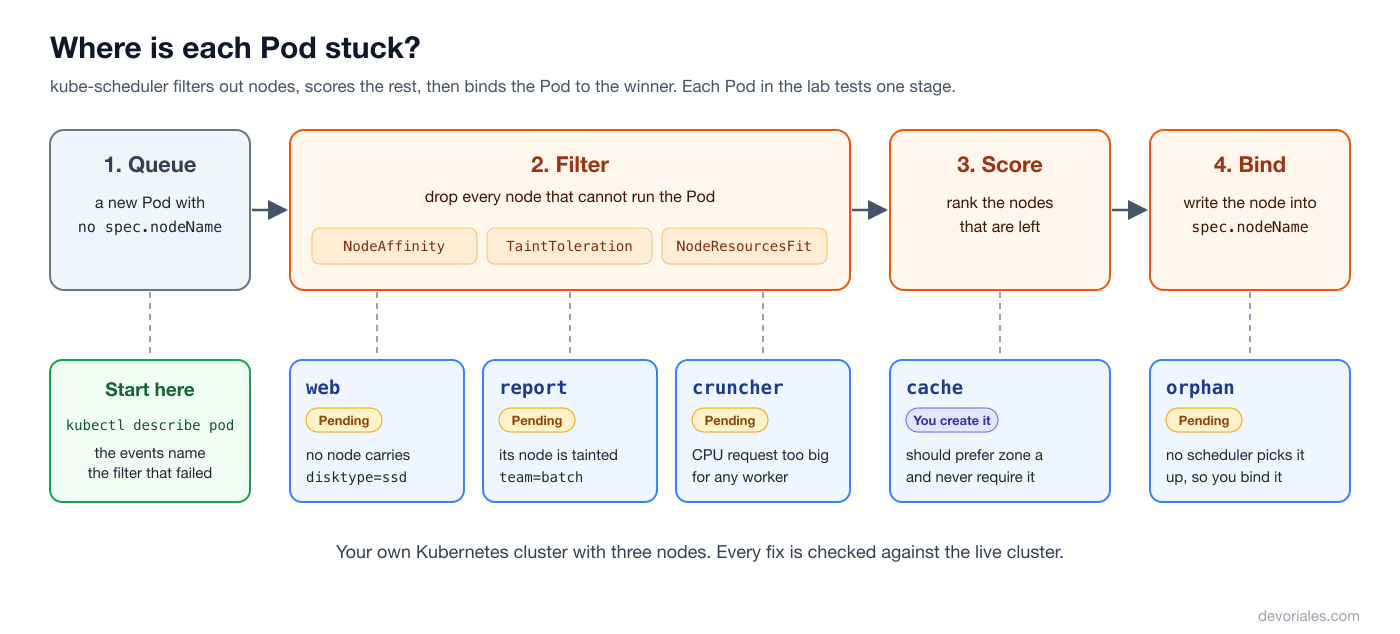
You fix each Pod at its cause: a node selector no node satisfies, a taint the Pod does not tolerate, a CPU request no worker can reserve, and a Pod that names a scheduler that is not running, which you place yourself by writing the Binding that kube-scheduler would have sent. One more step has you steer a new Pod toward a zone with a preferred node affinity, so it still runs when that zone cannot take it.
Each step states the result you need and leaves the commands to you. Hints open one at a time when you get stuck, and every step is checked against the live cluster. A fix that weakens the rule, such as deleting the taint, does not pass.
How the challenge works:
One lab, five steps, all on the same cluster. It starts with the Pods web, report, cruncher and orphan in Pending and their manifests in /root/manifests. Each step opens once the one before it passes, and its check reads the state of the cluster, so the only way through is a Pod that really runs. A lab session lasts 45 minutes.
Who this course is for
- Platform and DevOps engineers who get asked why a Pod is stuck in
Pending - Developers who deploy to Kubernetes and want to read the scheduler's events themselves
- CKA candidates practising scheduling: taints, tolerations, node affinity and resource requests
- Anyone who has read the scheduler docs and wants to work through the failures on a real cluster