



Claude Session Hub: Every Claude Code Session in One Pane
On a normal day I have many Claude Code sessions open. A lot of context switching which sometimes makes me crazy.
And sometimes I keep losing them. I would cycle through tabs to find the one where I asked about the e2e timeout, or I would remember a good conversation from yesterday and have no idea which folder it ran in. Yeah, I could use /resume but still not a great overview.
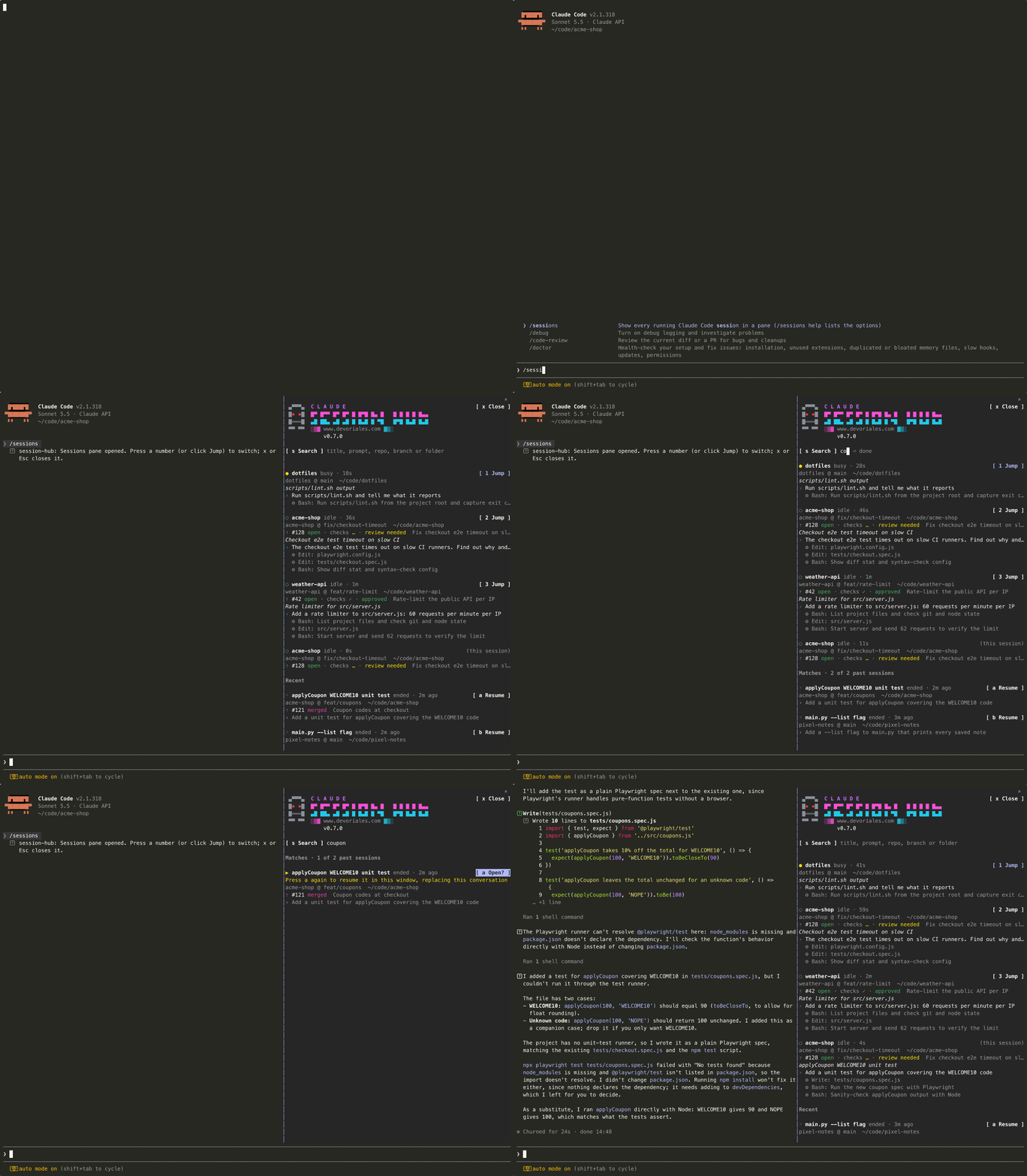
To my rescue, I built a small plugin for that: Claude Session Hub. You type /sessions and a pane opens next to your conversation, listing every Claude Code session on the machine:
The plugin lives on GitHub at github.com/devoriales/claude-session-hub. That is where you find the code, the full README and the issue tracker, so star it, fork it, or open an issue when something breaks.
Each running session gets a block with:
- its name, whether it is busy or idle, and when it was last active
- the repo, branch and folder it runs in
- the pull request opened from that branch, if there is one: number, state, checks and review status
- its title, its last few prompts and its last few tool calls (commands run, files edited)
Current live sessions come first. The session you are typing in is marked (this session).
Below the running sessions sits a Recent list with the sessions that are no longer running. That part turned out to be the one I use most.
Jump to a running session
Press 1 to 9 (or click Jump) and the hub brings that session's window to the front. In tmux it switches to the pane. In iTerm2 or Terminal.app it selects the exact tab. In VS Code, Cursor or Windsurf it raises the editor window for that folder.
Unfortunately, one thing it cannot do is pull a running session into the terminal you are looking at. A running session is a separate claude process that owns its own terminal, and no plugin can move a process from one terminal to another. Jump takes you to it instead.
Resume an old conversation
Press a, b, c and so on to reopen a session from Recent. The first press only marks the row and tells you what it is about to do. Press the same key again within five seconds to confirm, because resuming replaces the conversation you are in.
If the old session ran in the same folder as the one you are in, the hub runs /resume <id> in your current window. Your current conversation is not lost; it moves to Recent and you can come back to it the same way.
If the old session ran in a different folder, it opens in a new terminal window in that folder instead. Claude Code ties a process to the folder it started in: that folder decides where the transcript lives, which CLAUDE.md and settings load, and where Bash and the file tools run. A session cannot switch folders halfway, so the hub starts a new one in the right place and runs claude --resume <id> there.
Search
Press s in the pane and start typing. The list narrows as you type to the sessions, running or ended, whose title, prompts, repo, branch or folder contain every word you typed, in any order and ignoring case. acme timeout finds the session in the acme-shop repo where I asked about a timeout.
Search covers your whole history, not only the latest eight sessions, and it checks up to 25 prompts per session. You can find a conversation by something you asked early in it, even if the row only shows the last prompt. Press Enter to jump to the first match and Enter again to open it. Esc clears the search, and a second Esc closes the pane.
You can also search straight from the prompt:
/sessions checkout timeout
How it knows about every session
The hub keeps no database of its own. It reads what Claude Code already stores:
| What you see | Where it comes from |
|---|---|
| Running sessions, busy or idle | claude agents --json, Claude Code's own list of live sessions |
| Titles, prompts, tool calls | the transcripts in ~/.claude/projects/<folder>/<session-id>.jsonl |
| Repo and branch | git rev-parse in the session's folder |
| Pull request | gh pr list --head <branch>, at most once a minute per branch |
Because the data comes from Claude Code itself, the hub sees sessions in any terminal, editor or tmux pane, including ones started before you installed it. It reads only the lines it needs from each transcript with grep and tail, since a long session's transcript easily runs to several megabytes.
It also costs you no tokens. Nothing in the hub calls the model: the list, the search, Jump and Resume are local commands and file reads. The only network call is the optional gh lookup for PR status, and without gh installed and logged in, the PR line is left out. The pane refreshes every five seconds, and only while it is open.
It is a mod
Claude Session Hub is a Claude Code mod which is a plugin with a hooks module. The plugin points Claude Code at a TypeScript file, and that file hooks into a few events:
session.startregisters the/sessionscommand and starts the refresh timercommand.runhandles/sessions,/sessions -a,/sessions <words>and/sessions closeui.renderdraws the pane: the banner, the search field, the rows and their buttons and hotkeysui.closelets Esc clear an active search before it closes the pane
Unlike the shell-command hooks you put in settings.json, these run inside Claude Code and get an API for drawing UI, keeping state and running local programs. Each hook passes the event on with next(e), so the hub adds its command and its pane without getting in the way of other plugins.
Install it
The README on GitHub covers every install option, including a terminal-only setup, how to reinstall and how to remove the plugin. The short version:
In Claude Code:
/plugin install session-hub --marketplace devoriales/claude-session-hub
Answer y to add the marketplace and pick the user scope, so it loads in every session. Then type /sessions. You should see the pane with s Search under the banner and the plugin version below www.devoriales.com.
The install may print 3 userConfig options not yet set. Those are the three optional settings at the end of this post, and without them the defaults apply, so you can ignore it.
To update later:
claude plugin marketplace update claude-session-hub
claude plugin update session-hub@claude-session-hub
Then run /reload-plugins in any session that is already open. If the version under the banner did not change, the session is still running the old copy, and a restart fixes that.
Make it show more or less
Three settings control how much the pane shows: recentCount (rows in Recent, default 8, up to 24), promptCount and actionCount (lines per session, default 3). Change them with /plugin configure session-hub@claude-session-hub inside Claude Code, or from a shell:
echo '{"recentCount":"12","actionCount":"0"}' \
  | claude plugin configure session-hub@claude-session-hub --values-stdin
The code is on GitHub at devoriales/claude-session-hub. If it finds the wrong session, misses one, or opens the wrong terminal, open an issue there with the terminal you use and what claude agents --json prints.
Comments 0